 TX50U Outdoor Sensor Setup - No outdoor temperature scrolls on display TX50U Outdoor Sensor Setup - No outdoor temperature scrolls on display
Verify if the outdoor temperature shows on the display:
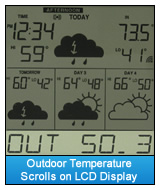
Watch the scroll line for the outdoor temperature to appear. Press the "+" key on Non-Audio units, the DISPLAY key on WD-9535U or the SNOOZE key on Audio Units. Allow up to10 minutes for the OUT --.- data to scroll (see illustration). If no outdoor temperature appears, select the appropriate instructions for your unit from the options listed below.
- To re-start a Non-Audio TX50 Temperature:
- Bring the TX-50U Outdoor Sensor in to a 5 foot distance from your Display.
- Remove batteries from the Display and the Sensor. Press any key on the display 20 times to clear residual power. Wait 15 minutes.
- Install brand name alkaline batteries testing at 1.48 volts into the Display. Insert the batteries with the "+" and "-" polarity observed as marked. If inserted wrong, the Display will not work.
- When the forecast icons appear on the Display, install 2 AA alkaline batteries into the Sensor. Insert the batteries with the "+" and "-" polarity observed as marked. If inserted wrong, the Sensor will not work. Do not press any buttons for 15 minutes.
- Watch the scroll line for the outdoor temperature to appear or press the "+" key for an instant outdoor temperature reading.
- After waiting 15 minutes to allow a strong connection to form, you can now place the sensor outside.
- To re-start an Audio TX50 Temperature:
- Bring the TX-50U Outdoor Sensor in to a 5 foot distance from your Display.
- Remove batteries from the Display and the Sensor. Press any key on the display 20 times to clear residual power. Wait 15 minutes.
- Install fresh brand name alkaline batteries testing at 1.48 volts into the Display. Insert the batteries with the "+" and "-" .polarity observed as marked. If they are inserted wrong, the Display will not work.
- When the forecast icons appear on the Display, install 2 AA alkaline batteries into the Sensor. Insert the batteries with the "+" and "-" polarity observed as marked. If inserted wrong, the Sensor will not work.
- Press and hold the SNOOZE button until you hear it beep. Release the button. (Note: You may hear two beeps.)
- After waiting 15 minutes to allow a strong connection to form, you can now place the sensor outside.
- To re-start a WD-9535U TX50 Temperature:
- Bring the TX-50U Outdoor Sensor in to a 5 foot distance from your Display.
- Remove batteries from the Display and the Sensor. Press any key on the display 20 times to clear residual power. Wait 15 minutes.
- Install 2 AA alkaline batteries into the Sensor. Insert the batteries with the "+" and "-" .polarity observed as marked. If inserted wrong, the Sensor will not work.
- Install fresh brand name alkaline batteries testing at 1.48 volts into the Display. Insert the batteries with the "+" and "-" polarity observed as marked. If they are inserted wrong, the Display will not work.
- Insert batteries in the WD-9535U display. The process of updating data to reload the forecast icons should pick up the nearby outdoor temperature sensor.
- The DISPLAY key will change the data in the center window on the display. Look for the word �Out� on the right side of the window. It should display an indoor temperature, until the sensor moves outside.
- After waiting 15 minutes to allow a strong connection to form, you can now place the sensor outside.
|