The Display Registration Process Explained
What to expect during registration of the Display:
- Click Here to Register your Display or continue reading for an explanation of Display Registration. You can also click on Register on the top menu.

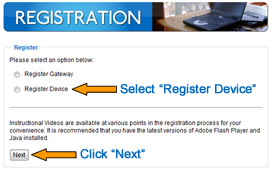
- Choose Register Device and click Next
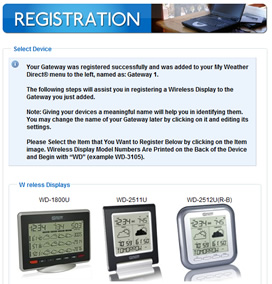
- Select your Display from the pictures on the website. If you aren't sure, select the closest match, and when the display chip is read, your entry will be corrected by the server.
Standard Gateway: after inserting batteries into the forecast station use the Click Here to Continue button on the Display Registration Page to see the status bar. USB Transceiver (Gateway): Your Gateway button is on the software screen; right click on the icon in your system tray to open it (look in the lower right for a blue square with a yellow sun). Refer to our USB Gateway Registraton website page for assistance if necessary. Either Gateway: It is OK to press the gray button on the standard gateway or the on-screen gateway button for USB users, more than once as the progress bar advances across the screen if you wait at least 20 seconds between attempts.
After pressing the Gateway button correctly, your Display should read WAITING TO REGISTER, then GO TO PC TO SELECT LOCATION. At this final Display message, you should see a Wireless Display Settings screen appear on the website to allow you to select your Time Zone and Location preferences. On initial registration you only have about 120 seconds, so fill out and SAVE an initial choice which you may edit later. As you watch the display, it will say UPDATING then the boxes will fill with forecast data. A non-audio unit needs about 5 minutes, an audio unit may need up to 15.
Additional registration information is in our illustrated Registration Guide (PDF).
|